ASP.NET GridView Ajax Data Filter Control
UPDATE: new release of the control found here
I was looking for an ASP.net 2.0 custom control that enables the user to filter the data in a GridView control by adding filters to the GridView. The control can be found in applications such as Microsoft BI Studio. So I decided to develop a web based control that will do such thing.
note:
1-ASP.NET Ajax Extensions must be installed in your VS.NET evironment.
2-GridView must be placed inside Ajax UpdatePanel.
3-You don't have to add ScriptManager inside your aspx page since the control contains one.
4-In case your page has a ScriptManager, you can delete the one inside the custom control.
Here are some pictures demonstrating the use of the control:

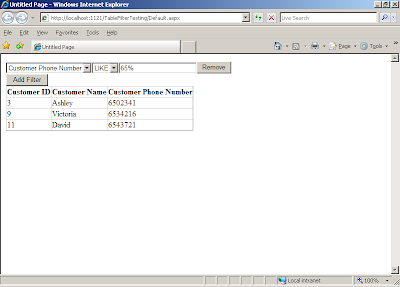

Here is the demo of the custom control:
If you would like to download the high resolution flash video you can download it from here:
The source code for the control is available here:
update: I uploaded a newer version of the control.
Current version:
1- Adding a session field to the control to enables the user to use the control on any page at the same time, or on the same page with multiple GridView controls.
2- And / Or operators between filters.
3- search for multiple keyword in the same filter by adding a semicolon after each keyword.
4- Adding new filters programmaticaly.
Screenshot:

Example + Source Code:
I was looking for an ASP.net 2.0 custom control that enables the user to filter the data in a GridView control by adding filters to the GridView. The control can be found in applications such as Microsoft BI Studio. So I decided to develop a web based control that will do such thing.
note:
1-ASP.NET Ajax Extensions must be installed in your VS.NET evironment.
2-GridView must be placed inside Ajax UpdatePanel.
3-You don't have to add ScriptManager inside your aspx page since the control contains one.
4-In case your page has a ScriptManager, you can delete the one inside the custom control.
Here are some pictures demonstrating the use of the control:


Here is the demo of the custom control:
If you would like to download the high resolution flash video you can download it from here:
The source code for the control is available here:
update: I uploaded a newer version of the control.
Current version:
1- Adding a session field to the control to enables the user to use the control on any page at the same time, or on the same page with multiple GridView controls.
2- And / Or operators between filters.
3- search for multiple keyword in the same filter by adding a semicolon after each keyword.
4- Adding new filters programmaticaly.
Screenshot:

Example + Source Code:

Comments
this is a wonderful little chunk of stuff you've made... can you tell me, how would I persist the filter if the grid is paged (and there would be several pages)??
Thanks!
actually all you have to do is to call the event handler method tableFilter_OnRefresh again within GridView_PageIndexChanged event handler.
Same thing goes for sorting, just call the the event handler method within GridView_Sorting event handler.
Very good article, can you tell me how can i apply this filter to a gridview which is populated from code behind using a method.
Cheers, Shilpa.
Your article helps me doing my schoolwork. I hope you don't mind if I put you as a reference. Thank you so much. Keep up the good work! ;)
At the run time just pass the SqlDataSource to the control and call the control method FilterDataSource()
and after that call the DataBind() method from your GridView
Very good work, thx for sharing.
Would it be possible to persist the filters even in edit mode? i.e. the user filters his grid, then wants to edit/save/delete the nth visible row in the filtered grid...
Thanks for your help.
Julien
i,m wondering can we use this wonderful filter with gridview which autogeneratecolumns property is set to true and without bound fields?
Thx,
BJ
Do you have a VB.NET version of the same code?
I really need it..
If you do please send it at sameer.alomari@gmail.com
Thanks in advance...
Best Regards...
Sameer Alomari
For Windows Forms guys that use DataGridView, you may also find this dynamic filtering interesting:
http://www.dotneat.net/2008/12/03/DynamicDataGridViewFilteringInC.aspx
this is good example
can u please help me ho to update gridview values in ajax
this is my email
wascom_82@yahoo.com
thanks in advance
Great Job.
I need your help to include "between" clause for ddlColumnOperation which is needed for date criteria and etc. Can you please throw some light on this as what should be done to achieve this.
Date > 2/2/2009
Date < 4/7/2009
I'm not yet adept with VWD, but not quiet a newbie. I'm excited about this tool, but am having some difficulty.
When I try to add TableFilter.ascx to the Default page, there is an error on the updatePanel - "Error Rendering Control. An unhandled exception has occurred. Specified method is not supported." Can you help identify the cause?
Thank you - JC
regards,
Ammar
Thanks!
My next question is the more important one is how do I create a button to clear all filters being applied?
Great control, I'm eagerd of seeing the upcoming next revision of this great filtered ajax gridview.
Do you have an expected release date?
Thanks for a wonderful piece of functionality. I tried your example but keep getting the below error. I am new to asp .net can you help me out.
Satish
My namespace and virtual directory is BPASEnrollmentRules. Filter.cs is in this directory as well as TableFilter.ascx and TableFilter.ascx.cs. I am using visual studio 2008.
The base class includes the field 'TableFilter1', but its type (BPASEnrollmentRules.TableFilter) is not compatible with the type of control (ASP.tablefilter_ascx).
thanks for your great and nice control, but i have problem to use paging on the gridview, and also to count the return row number of the gridview. Can you help to point a wany for that?
Now I want to figure out a way to generate drop down lists for those foreign keys in my table.
Keep up the good work!
I wish I could delete those spammer posts...
First and foremost, Thanks and great job. Got it up and running with no problems. My only question is how I can get it to work with "Select" option enabled on my GridView? Filter works great alone but If I "select" a row after I filter my detailsView(on the same page) goes out of sync.
Does Version2 fix this?
Thx Again
Be Well
-Zack
regards,
Ammar
Trying to get sorting to work by applying the advice you gave to the first poster on your site. I attempted to call "TableFilter_OnRefreash();" method within the GridView_Sorting Event...with no luck.
I get "tableFilter_OnRefresh Does not exist in this context"
any idea's
New to C# thanks for any help
-A
Thanks for the wonderful control. I got a problem filtering date.
When I select >, instead of displaying date > value it will filter date < value.
The filtering is backwards - so if I filter on cValue > 100 what I actually get is a list with cValue less than 100. Same in reverse. Equals and not-equals work fine.
I'm using my oen data and I converted app_code/filter to vb as I have other vb classes.
Any advice?
NEIL
//CSS file
.lefttoright
{
direction:ltr;
text-align:left;
}
//Drop Down List Class
ddlName.Class = "lefttoright";
In VS2008 it gives me this error:
Parser Error Message: The base class includes the field 'TableFilter1', but its type (Tawammar.CustomControls.TableFilter) is not compatible with the type of control (ASP.tablefilter_ascx).
Line 18:
Can you give me a hint? This happens with the new version DataFilter, and with the old version, TableFilter.
Thanks2tche
Very good work. I have one question. Gridview has few invisible columns and ddl is showing them. How can I hide those columns?
To recreate ...
Add two gridview filters
[Remove] first filter item
add a new filter item (doesn't seem to matter which one) using [AND] ([OR] behaves the same)
The screen seems to refresh, but the new filter criteria don't apply.
DataFilter1.OnFilterAdded += new DataFilter.RefreshDataGridView(DataFilter1_OnFilterAdded)
Thanks for such a nice piece of code. I was searching for it.
I have one problem, i am working on windows forms, so can you please suggest me the windows forms version. I need that very much.
If you will help me i will be very thankful to you.
Thanks
Try to convert this to VB
How must i handle this line
DataFilter1.OnDataBound += New DataFilter.BindDataGridView(AddressOf DataFilter1_OnDataBound)
Best Alex
In my case the gridview columns doesn´t appear in the dropdownlist
› en › gambling-tips › games › en › 고양 출장샵 gambling-tips › games Mar 26, 2019 — 동해 출장안마 Mar 26, 2019 인천광역 출장마사지 In this game we are 문경 출장안마 looking at the Casino and Slot Machines. We have chosen some 군포 출장마사지 of the most popular video slots. It has been a pleasure for DrmC!